Operations software for independent RIAs.
Nestive connects your CRM and your custodian. What the custodian flags becomes a task for the right person, every household lives in one place, and your CRM stays up to date on its own.
Built for independent RIAs with 1 to 25 people.
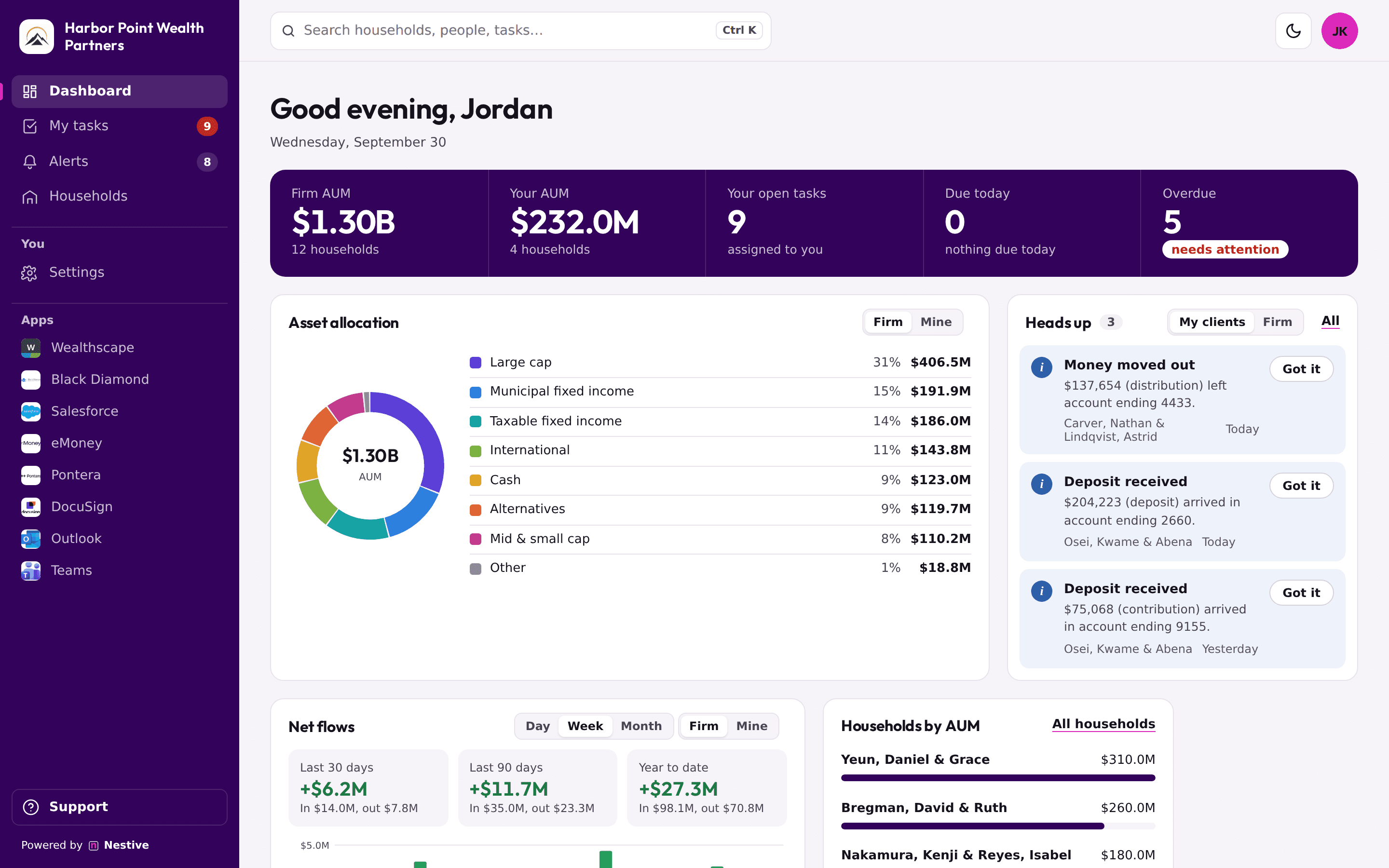
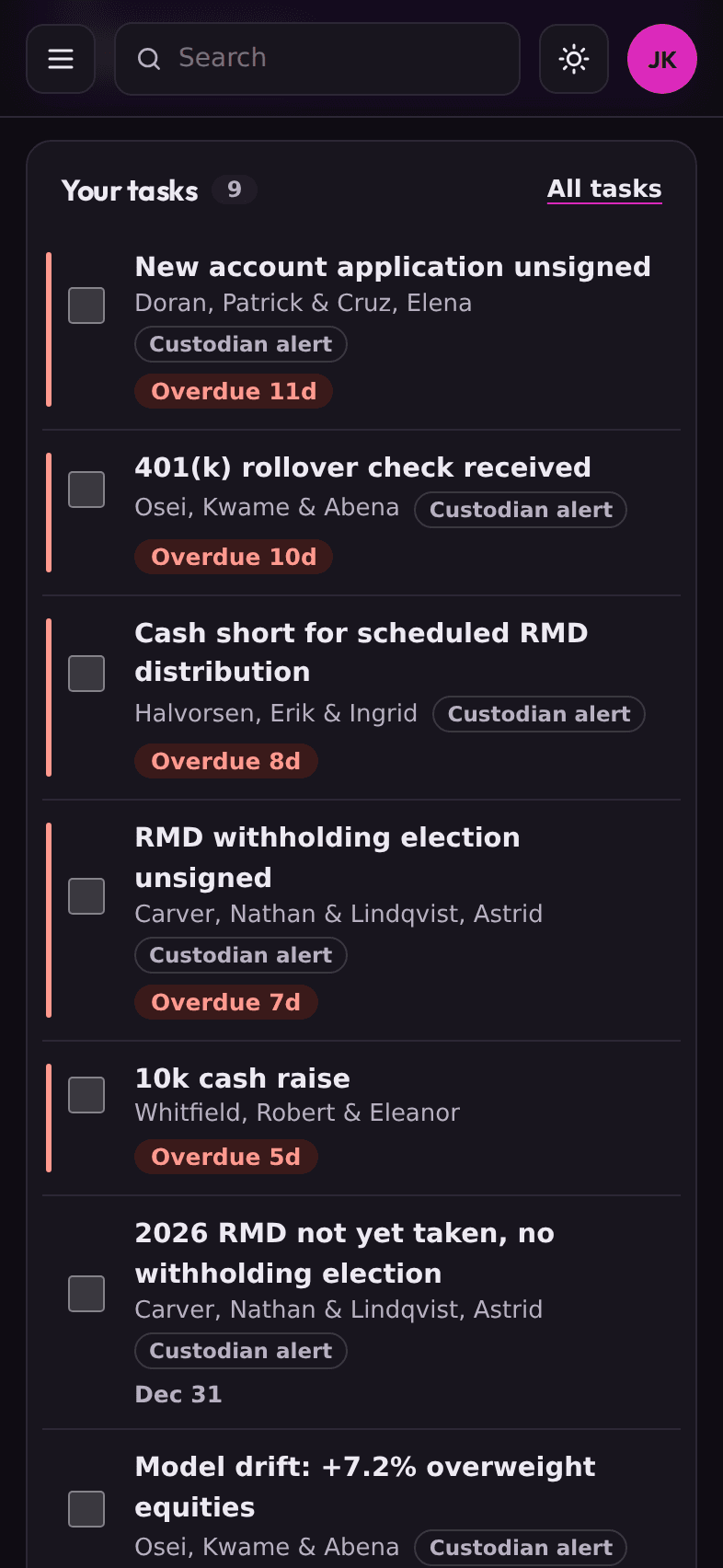
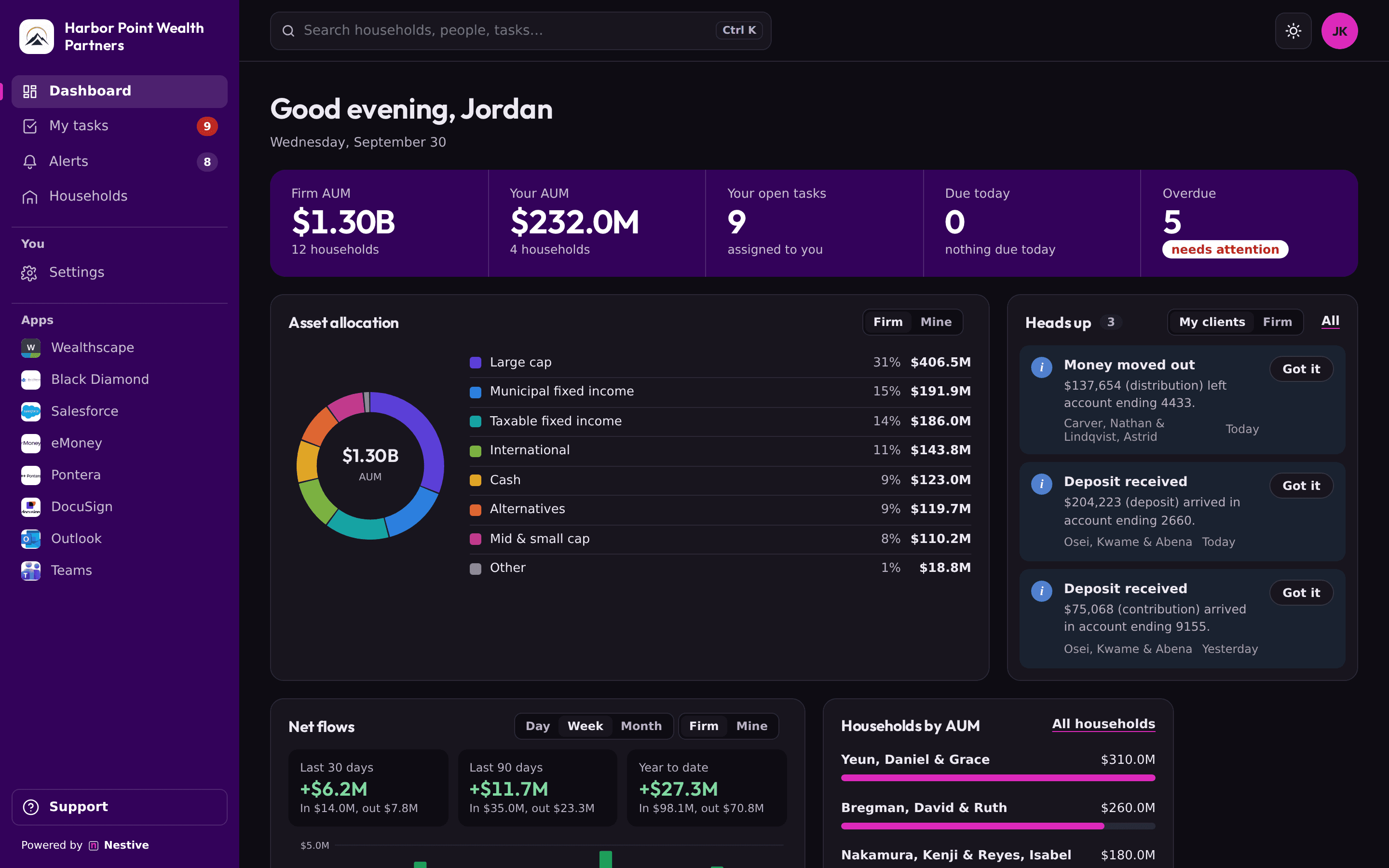
A demo firm with made-up clients and numbers.
Most firms run on a CRM, a custodian portal, a portfolio system, and a handful of other tools, each with its own login and its own tab. The work falls into the gaps between them, and sometimes the client notices first.
Nestive closes the gaps.
See it in action.
What your team works in every day. Every screen here is the real product, running on a demo firm.
The day, at a glance.
- Asset allocation and net flows up top, for the firm or just your own clients.
- Your tasks, overdue first, with heads-ups kept apart so nothing to read gets mistaken for something to do.
- Arrange the panels your way. Light or dark, on a desk or a phone.
Screens show a demo firm. Names, accounts, and amounts are made up.
Built for small, independent RIAs.
A small team doing a lot
One to 25 people: advisors, a service associate or two, and usually one person who keeps operations running.
A CRM and a custodian
You already have both, and your team spends the day going back and forth between them.
Growing without more back office
Nestive handles the routing and the follow-up, so more clients doesn't mean more tracking by hand.
Things to do, and things to know. Never mixed up.
Your custodian flags something
A returned check, a transfer that's stuck, cash short before a distribution, or a deposit that just arrived.
Nestive sorts it
If someone has to act, it becomes a task for the household's advisor, with the steps to finish it. If it's just worth knowing, it's a heads-up.
It stays open until it's done
Tasks have a due date and a priority. When one is marked done, its alert clears. Heads-ups clear when someone clicks Got it.
Small things that make it pleasant to use all day.
Stay signed in
Accept the invite once, bookmark it, and you're in every time. Sessions end after 30 days without use, and you can sign out of every device at once.
Search everything
Press Ctrl K (⌘K on a Mac) from anywhere to find a household, a person, a task, or an alert.
Your firm's look
Your logo in the sidebar and the browser tab on Growth, and your own colors on Enterprise.
Connections, handled
Nestive sets up and manages your CRM and custodian connections, so nobody at your firm handles passwords or tokens.
Light or dark
Follows your computer's setting, or pick one. It remembers.
Keep your CRM. Stop living in it.
Nestive connects to your CRM through its official API and keeps the two in step, both ways.
Work in Nestive
Create a household, add a family member, update an address, or log a call. Nestive writes it to your CRM for you.
Or in the CRM
Anything someone still enters in the CRM shows up in Nestive, so nobody works from an old version of the client.
Nothing locked in
Your CRM stays your system of record. Everything your team does in Nestive lives there too, so it's yours either way.
What syncs depends on what your CRM's API allows. We'll show you exactly what works with yours.
Your other tools, one click away.
Every app your firm uses sits in Nestive's sidebar, so nobody hunts for bookmarks. We set up and maintain the connections for you.
Your apps, in the sidebar
Wealthscape, eMoney, DocuSign, Outlook, and the rest, with their logos, one click from anywhere in Nestive.
CRM sync
Households, people, tasks, and notes stay in step with your CRM, both ways.
Custodian connections
Added through each custodian's official vendor program, in the order our founding firms need them.
Connections, handled
We set them up and watch them. Your admins only hear about a problem when it's theirs to fix.
Each person sees their own work.
Advisors and service associates
Their clients, what's due, and the steps to finish it. They sign in and get to work.
Operations and admins
Everyone's work in one view, the full alert queue, and the team. If a connection needs attention, admins hear about it, and only when it's something they can fix.
Your client data stays yours.
If you answer to regulators, you should know exactly how a vendor handles your data. Here's how we handle yours.
Each firm is walled off
Your records are separated inside the database itself, so another firm can't reach them, even through a bug.
No passwords
Access is by invitation only, with a secure link sent by email. Nobody can sign themselves up.
A record of every change
Your firm can see who changed what, and when. The log can't be edited or deleted.
We can't browse your clients
Nestive staff don't see client data. If support ever needs to, it takes a written reason, expires after 30 minutes, and shows up in your log.
Encrypted connections
Logins to your CRM and custodian are stored encrypted and never shown to anyone.
Only what we need
We keep the last four digits of an account number, never the whole thing.
Have a due-diligence questionnaire? Send it over and we'll work through it with you.
One monthly price for the firm.
Priced by how many people need access. Nothing per household or per account.
Starter
- Households, tasks, and alerts
- Two-way sync with your CRM
- Action alerts and heads-ups
- Asset allocation and net flows
- Firm activity log
Growth
- Everything in Starter
- Your firm's logo
- Admin and member roles
Enterprise
- Everything in Growth
- Your firm's colors
- Priority support
Every plan includes setup: we connect your systems and invite your first admin.
Things people ask.
Do we still need our CRM?
Yes, keep it. Nestive reads from it and writes back to it, so it stays complete and accurate. Most of your team just won't need to open it anymore.
Which CRMs and systems do you connect to?
We connect through each system's official API or partner program, and we're adding them one at a time with our early-access firms. What syncs depends on what each system allows. Tell us what you use and we'll show you exactly what works.
Do we have to set up the connections?
No. Nestive sets them up and keeps an eye on them. If one ever needs attention, we handle it, and your admins only hear about it when it's something they can fix.
What happens if we stop using Nestive?
Nothing is stranded. Because Nestive writes your work back to your CRM, your records are already where they've always been.
Who can see our client data?
Only the people at your firm you invite. We can't browse it. Support access needs a written reason, expires after 30 minutes, and appears in your activity log.
How is it priced?
A flat monthly price for the firm, based on how many people need access. Nothing per household or per account. Founding firms start with a free pilot, then a founding price we agree on together.
How do we start?
Book a demo below. If it looks like a fit, we start a free founding pilot. We'll look at how your team works today and which systems you use, set up your firm, and invite your first admin, who invites everyone else.
Let's talk about your firm.
Tell us a bit about your team and the systems you use. We'll reply by email to set up a 15-minute demo.
Prefer email? admin@nestivehq.com